A used laptop can look immaculate and still have very little supported life left. Before comparing prices, establish how long its manufacturer-backed software updates will continue. A seller’s purchase receipt, a fresh reset and a claim that it is “fully updated” answer different questions.
This guide focuses on buying a second-hand Chromebook running ChromeOS. Google publishes model-specific automatic-update deadlines, making it possible to check a listing before paying. These dates do not establish battery condition, warranty coverage or suitability for every application. Keep those as separate buying checks.
Turn the listing into an exact model
Ask for the manufacturer and full model designation, including letters, numbers and generation suffixes. A listing headed “Acer Chromebook 311” is a starting point, not a complete identification. Save the listing and the seller’s answer together so you can compare them with the delivered machine.
Ask the seller for a clear photograph of the underside model marking. They can cover the serial number; you need the model identifier for the support lookup, not a public record of their individual device. A regulatory code may need translating through the manufacturer’s product information before it matches Google’s product name.
The physical example here is an older Chromebook Pixel: its underside shows “Model CB001” beside a separately redacted serial number. It illustrates where identifying text can appear, not a recommendation to buy that model. Your candidate’s marking and Google’s matching entry must be checked independently.
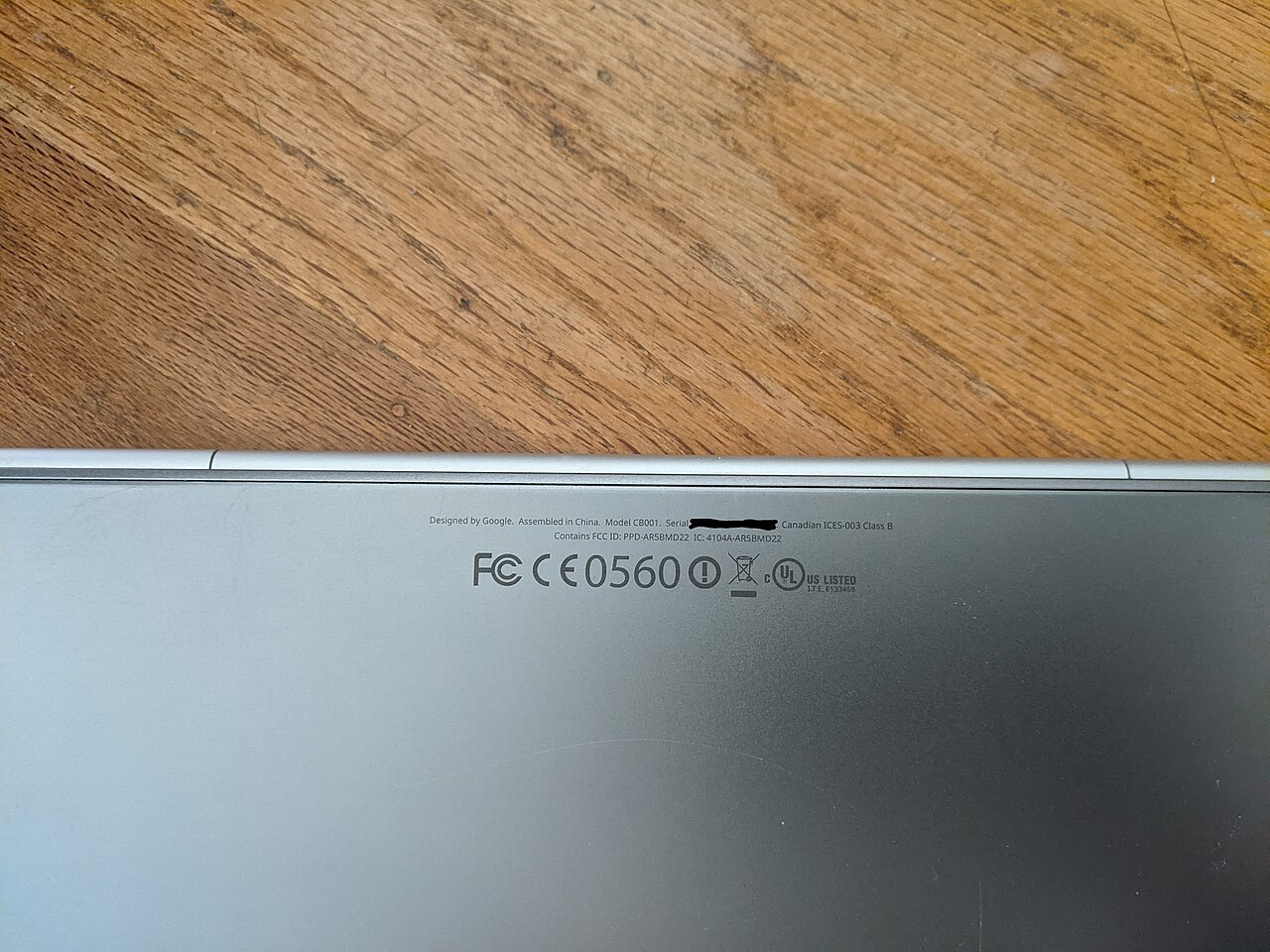
Look for the model marking rather than sharing the serial number. This historical Pixel example shows Model CB001; it does not establish support for a laptop you are buying.
Version notes
Physical marking photographed 2021-03-16; unchanged Commons 1280px rendition inspected 2026-10-31. Evergreen identification example on historical hardware, not a current ChromeOS screen or purchase recommendation. Serial redaction is already in the source.If the label is missing or unreadable, ask for another reliable model record from the seller. Do not infer the generation from lid colour, screen size or a stock listing photograph. If you cannot confidently identify the device, leave its remaining support marked “unknown” and postpone the purchase.
Read the support deadline before arranging collection
Open Google’s Auto Update policy, find the manufacturer and match the complete product entry. Record the month and year under Automatic updates until, plus any asterisk. Save the page link and the date you checked it in your buying notes.
Google defines the ten-year update period from the platform release date. Buying used does not restart that clock. Refurbishment does not create a fresh ten-year period either. Google also distinguishes a manufacturer’s end-of-sale date from update eligibility: the date a shop stopped selling a machine is not its software deadline.
The table demonstrates why suffixes matter. At this check, Acer Chromebook 311 entries include C722/C722T with June 2030 and CB311-12H/CB311-12HT with June 2033. Those are different entries beneath a similar retail name. Treat them as an identification example, and recheck the official table for the actual model you are considering.
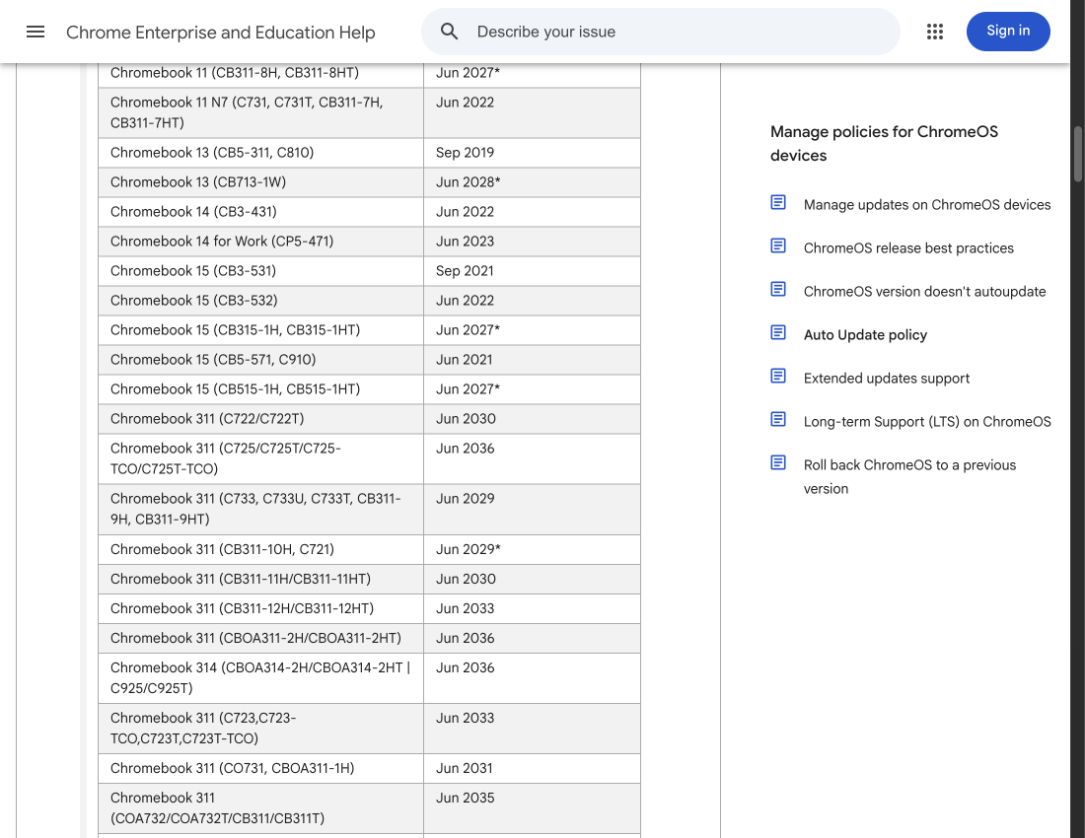
Match the complete suffix, not just Chromebook 311. Google’s table puts C722/C722T at Jun 2030 and CB311-12H/CB311-12HT at Jun 2033. Other rows have an asterisk for extended updates. Reopen the policy before buying; this lookup is not a check of an individual used device.
Version notes
Actual public policy-page capture made 31 October 2026. The Acer section was opened and both exact rows were visually checked. This is a current website lookup, not a ChromeOS settings screen, manufacturer promise for all models, or a tested physical machine. Table contents may change.Write down your own intended finish date next to the support deadline. If you want a laptop to last through a three-year course, support ending midway through the course is a purchasing constraint today. Allow some time to choose and move to a replacement rather than planning a migration during a deadline week.
An asterisk can change which apps you can use
On Google’s table, an asterisk identifies devices that require opting in to extended updates. Follow the linked Extended updates support explanation before treating the later date as an ordinary continuation of the same features.
For eligible older Chromebooks, extended updates remove Android apps and the Google Play Store and erase on-device Android app data. Google says opting in is irreversible. Continued security support therefore comes with an application tradeoff; a seller demonstrating an Android app today does not establish that it will remain available throughout the advertised extended period.
List the applications you actually need. If one requires its Android version, verify whether its publisher offers a suitable browser alternative before buying an asterisked model. Try that alternative on a trusted device with a disposable task. Opening a website is not enough: check the function you rely on, such as exporting a file or working without a connection.
Do not ask the seller to opt in merely to prove that the button works. It changes their device and can destroy their app data. Ask whether extended updates have already been enabled and whether the machine still meets your needs in that state. If Android support is essential, choose a candidate whose remaining ordinary support covers your intended use.
Have the seller show the date on the actual Chromebook
Before paying, ask the seller to demonstrate the following in their existing session, or provide a photograph of the result for a remote sale. You do not need to enter your own Google account to inspect their update schedule.
- Select the time at the bottom right, then Settings.
- Open About ChromeOS, then Additional details.
- Find Update schedule and read the displayed last-update date. Record it alongside the model and the official table entry.
This is Google’s documented update-schedule route. If the dates disagree, pause the transaction. Recheck the complete model, the table’s footnote and whether extended updates explain the difference. A screenshot from another identical-looking laptop does not resolve a mismatch on the machine being sold.
Then check present update health separately. In About ChromeOS, select Check for updates. Google’s update instructions say an available update downloads automatically; restart when requested to finish. Connect power and use a dependable internet connection. A successful update today still needs the future schedule check above.
If downloading fails, restart and retry on Wi-Fi or Ethernet. If the machine reports administrator-controlled updates, ask the seller to resolve the management situation before sale. Do not attempt administrative bypasses. Persistent failures belong with the seller while you still have the choice to walk away.
Price the time you can realistically use
Consider this hypothetical comparison: one machine costs $120 with 12 supported months remaining; another costs $210 with 42. Dividing purchase price by those periods gives $10 versus $5 per supported month. This is a planning comparison, not a prediction of lifespan or a claim about current market prices. Battery replacement, charger costs and suitability can change the decision.
A final-update notification means the Chromebook stops receiving ChromeOS and browser updates, including security fixes; it does not mean the hardware instantly stops booting. For a purchase intended for everyday online accounts, choose enough remaining support rather than budgeting on continued operation after that deadline.
Keep a short purchase record: exact model, official deadline, any extended-update condition, demonstrated device date, required apps and return deadline. If a delivered laptop differs, preserve those records and contact the seller within the return window before altering it.
Resetting or recovering ChromeOS does not renew the model’s published support period. Recovery also erases local data, so it is a poor experiment during a buying dispute. Once you accept a suitable machine, use a safe reset plan for the ownership handover. The date check has done its job when you know what supported time you are paying for.
Sources, versions & scope
The steps describe the documented controls and expected checks; they are not a claim that every device or software release has been physically tested. Platform and version differences are stated with the procedure.


,_bottom_detail_redacted_SN.jpg)