The folder before anyone tidies it
Imagine preparing a small repair workshop. The event folder contains Programme final.docx, Programme final NEW.docx, Programme final Jo edits.docx, Programme approved.pdf and Room quote.pdf. Which programme should receive tomorrow's correction? Which PDF went to the printer? Alphabetical order cannot answer either question.
This is a hypothetical transformation, not a report of files we tested. Its starting point is five ordinary documents; its goal is a folder someone else can understand. The exercise uses copies of harmless sample files. Existing project files, shared locations and their links stay in place.
The first change happens before renaming: open each sample and identify its role. Suppose the two later Word documents contain separate edits to the first draft, the approved PDF matches an acceptance email, and the quote came from the venue. Record those findings. Without that inspection, a tidy filename would merely give an uncertain document a confident label.

Give each name a job
For this event, use project_document_period_role.ext. The project is repair-day; the period 2026-11 means the event month, not the download or editing date. Lowercase words, hyphens inside phrases and underscores between fields make the pieces easy to distinguish. This is a local convention, not a filing standard.
| Before | After | What it tells the reader |
|---|---|---|
Programme final.docx | repair-day_programme_2026-11_base.docx | The earlier draft used to compare the two branches. |
Programme final NEW.docx | repair-day_programme_2026-11_branch-sam.docx | Sam's separate changes; not yet the master. |
Programme final Jo edits.docx | repair-day_programme_2026-11_branch-jo.docx | Jo's separate changes; equally preserved. |
Programme approved.pdf | repair-day_programme_2026-11_issued-r01.pdf | The first issued programme, supported by the acceptance record. |
Room quote.pdf | repair-day_venue-quote_2026-11_received.pdf | A received input, not the organiser's revised document. |
The branch names assume the contributors have been identified. If authorship is unknown, use branch-a and branch-b and record the uncertainty. Likewise, use received rather than issued-r01 when no evidence establishes approval. Preserve the supplier's original filename in the mapping, particularly if it contains a quotation identifier.
Keep the extension unchanged. Renaming a Word document to end in .pdf does not export it. These names deliberately avoid punctuation such as slashes in dates. Microsoft's OneDrive and SharePoint restrictions also depend on platform, application and path: a successful local rename does not establish compatibility everywhere. Avoid case-only distinctions and keep folders shallow.
Rehearse the five renames
Choose a local practice location that is not shared or automatically synced; Desktop and Documents may be synced on your machine. Use non-sensitive samples you are allowed to copy. If your organisation requires managed storage, use an approved private practice location instead.
- Create an empty folder called
naming-rehearsal. In File Explorer or Finder, select the five sample documents, choose Copy, open the new folder and choose Paste. Do not use Cut or drag them between folders. Check that the source files still exist and that you have five independent documents rather than shortcuts, aliases or web links. - Expose the suffixes. In Windows 11 File Explorer, choose View > Show > File name extensions, as described in Microsoft's File Explorer guide. On Mac, choose Finder > Settings > Advanced > Show all filename extensions, following Apple's extension settings. You should now see
.docxand.pdf.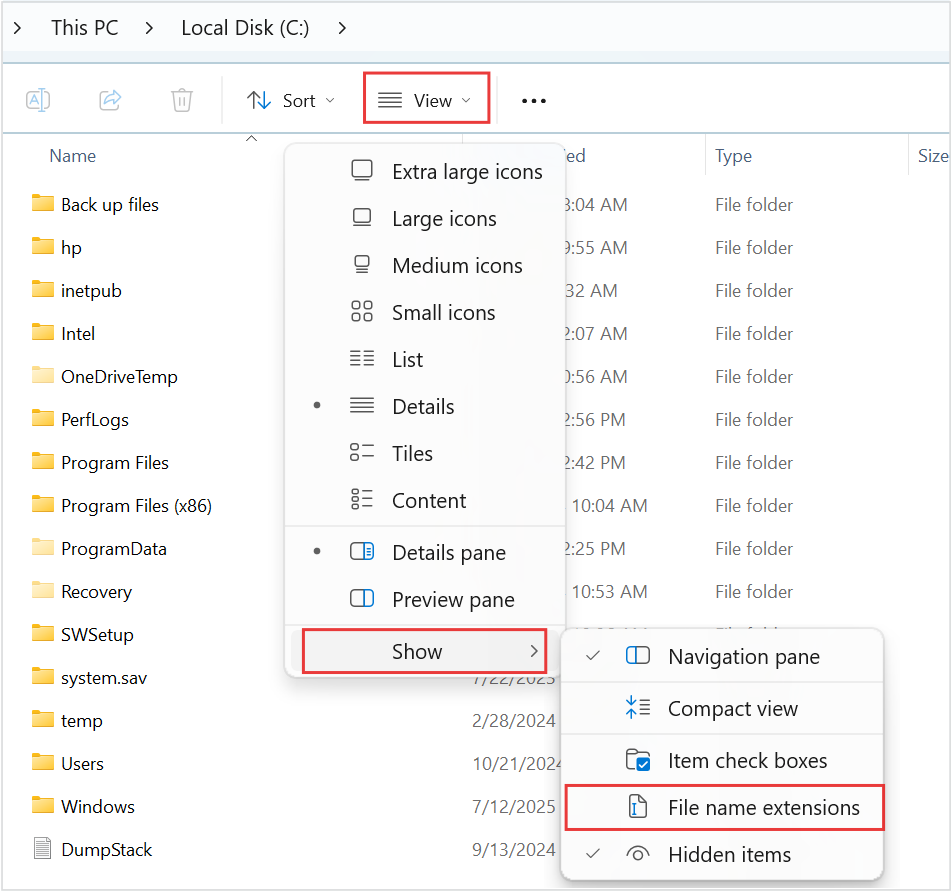
Visual 01 · Microsoft Windows 11 Microsoft Windows 11: View → Show → File name extensions exposes suffixes for inspection. The source outlines the menu route in red. The option is not checked in this image; enable it before checking your own sample filename.
Microsoft Corporation. Official support screenshot; copyright retained by Microsoft. Image source · Usage termsVersion notes
Microsoft’s current Windows 11 file-extension instructions provide this Windows 11 command-bar and Show-submenu image. Complete downloaded asset retained, including the source’s red outlines. Exact Windows build is not stated. Initial menu state only; it does not show the article’s files or completed extension display. - Create a plain-text note in the practice folder called
name-map.txt. Record each old name, proposed new name and role. Add the original source location. Rename only the five copies, one at a time: select a file and press F2 in Windows, or Return in Finder. Alternatively, use Windows' Rename command. Edit the base name, preserving the suffix. Cancel any extension-change or replacement warning. - Sort the folder by Name and locate the issued programme without opening every document. Then open that PDF to confirm the content. Open both branches too. A readable name and a document that still opens are useful first observations; they do not prove that a dependent application still finds it.
Apple documents the Finder action in Rename files, folders, and disks; Microsoft documents the Windows alternative in Rename a file. If the proposed names feel cumbersome in the ordinary list view, shorten the project code now, while only copies are involved.
Two drafts need a decision, not a higher number
Suppose Sam changed the start time to 10:30 while Jo added an accessibility note to a copy that still says 10:00. Calling Sam's file v03 and Jo's v04 would suggest a sequence that never happened. Neither branch contains all the intended changes.
Keep both. Nominate one person to reconcile the start time with the event owner and transfer the agreed changes into a new rehearsal document named repair-day_programme_2026-11_working.docx. Check the time and accessibility note explicitly. Record the branches used and unresolved decisions in the note. Creating this master adds a document; there is no need to delete either branch to make the folder appear efficient.
The working name stays stable through ordinary edits. When the owner accepts a corrected programme, export a separate issued-r02.pdf, preserving issued-r01.pdf. Record who accepted it, when, and which revision it replaces. Use two-digit revision numbers consistently so r02 sorts before r10. A filename carries the label; the acceptance record supplies its authority.
A good-looking folder can hide a broken link
A copied document can still point outside the rehearsal folder. Before testing hyperlinks, spreadsheet references or linked pictures, inspect their destinations. Do not edit a live source while assuming that copying its consumer isolated the relationship.
For a concrete dependency rehearsal, use two disposable Excel workbooks containing invented data. Put 7 in a source cell and create a formula in the other workbook by typing =, selecting that source cell and pressing Enter. Save both inside the practice folder. Close them, rename only the source copy, then reopen the consumer and inspect its reference.
In current Excel for Microsoft 365 on Windows, use Data > Queries and Connections > Workbook Links. If the link needs repair, use its More Commands (…) > Change source control to select the renamed sample. Microsoft's workbook-link documentation describes this route; older releases can show different controls. If those controls are absent, leave the rehearsal there rather than improvising on real workbooks.
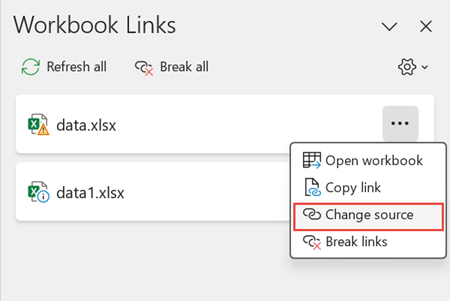
In Excel for Microsoft 365 on Windows, open the linked workbook’s ellipsis menu and choose Change source. Microsoft’s original outline marks the command.
Version notes
Current Microsoft 365 Excel for Windows Workbook Links workflow documented by Microsoft. Exact captured minor build undisclosed. Menu open at Change source before selecting a replacement workbook.Change the disposable source value from 7 to 9, save, and refresh the linked consumer. Seeing 9 helps distinguish a working connection from a cached 7. Avoid Break links: it replaces linked formulas with current values. This sample says nothing certain about a shared browser URL, a design project's images or another person's shortcuts. Check those actual dependencies separately before any live rename.
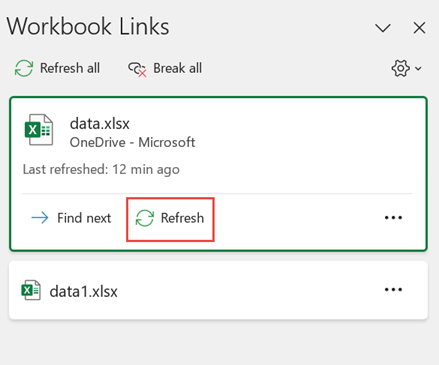
In Excel for Microsoft 365 on Windows, expand the linked workbook and select Refresh. This initial action screen locates the command for the rehearsal.
Version notes
Current Microsoft 365 Excel for Windows Workbook Links workflow documented by Microsoft. Exact captured minor build undisclosed. Expanded sample card illustrates selecting Refresh before checking the consumer’s value.The archive after the rehearsal
The proposed destination now has three modest folders: working for the agreed editable master; issued for accepted exports; and inputs for received material. Keep the earlier base and branches in a separate reconciliation folder with their mapping. This is an archive design to review, not an instruction to move today's shared files.
Version history supports a different task: recovering an earlier state within a document. For an approved OneDrive practice file, right-click it on the OneDrive website and select Version history to inspect availability. Microsoft's history guide notes that work or school administrators may disable versioning. Do not assume indefinite retention or select Restore just to investigate; restoration makes the selected version current. Issued copies and a separate backup plan still have their own purposes.
To undo this rehearsal, close the sample documents and reverse their names using name-map.txt. If you changed a sample link, return its source reference too. Preserve any useful reconciliation work separately. Because the originals were copied rather than moved, reverting the experiment does not require recovering the original project.
The useful handoff question is now specific: “Where do I change the programme, and which copy was issued?” Point to the working document and the recorded issued revision. If the rehearsal cannot give that answer, revise the convention before applying it to new work.
Sources, versions & scope
The steps describe the documented controls and expected checks; they are not a claim that every device or software release has been physically tested. Platform and version differences are stated with the procedure.