Book the handover after the migration
A buyer is arriving tomorrow. The old laptop still has your tax documents, and the phone beside it is the only device that approves your email sign-in. That appointment is premature. Arrange the transfer around evidence that your digital life already works elsewhere, with time left to resolve a missing file or account dependency.
This plan is for a personally owned, working phone or laptop. For equipment belonging to an employer or school, have the administrator arrange its release and disposal. A reset should not be used to work around management, an ownership dispute, or a device you cannot unlock.
Agree in advance what the buyer will receive: the exact device, charger, included accessories, and any removable storage. Explain that personal accounts and their passwords stay with you. Allow separate time for any agreed hardware inspection while you still control the device, then private preparation and the final setup check. A buyer's arrival must not become your deadline for solving account recovery.
The evidence stays on your side of the table
Keep a private transfer note on another trusted device or paper. Record the model, operating-system version, storage being transferred, backup destination, and the official handover procedure you intend to follow. Keep passwords and recovery codes out of this note. It should let you distinguish “copied” from “opened successfully elsewhere.”
- A file you cannot replace
- Recover a representative document from the backup onto a trusted destination and open it. Check the content, rather than just seeing its filename.
- An application with its own storage
- Check an important local project, chat archive, or other app-specific item using that application's supported migration route. If it cannot be verified yet, record the dependency and delay erasure.
- A photo you want to preserve
- Inspect a recovered original, not merely a library thumbnail. A usable preview does not establish that your original file is safely retained.
- The backup itself
- Confirm you can reach it without the retiring device and can obtain any encryption password separately. Disconnect removable backup media before the later erase procedure.
A sample restore demonstrates that a recovery route works; it does not certify every file. Review the folders and applications that matter to you, especially Downloads, local recordings, and work stored outside the usual document folders. Leave the source intact while filling gaps.
Do not tidy a synchronized library by deleting its contents before handover. Apple explicitly warns that manually deleting synchronized iCloud items can remove them across connected devices. Its supported device-erasure process has different consequences for the cloud library. Keep the library you intend to retain.
Rehearse the first morning without it
Use your replacement to open your primary email, password manager, and essential financial or work accounts through their genuine sign-in routes. Where practical, verify a fresh sign-in instead of relying entirely on an existing session. Watch which device receives an approval request. If the old phone is still doing the approving, the migration is unfinished.
Inspect each important account's recovery settings and confirm that you control the listed email address, number, or spare authentication method. Follow the provider's supported process to enroll replacement authenticators or passkeys where necessary. Do not assume every credential travels with a general device backup, and do not deliberately lock yourself out to test recovery.
Keep your phone service active until the replacement can receive the calls or codes you need. Transfer service through the carrier's procedure; removing an eSIM profile from a handset does not establish that the replacement service works. Decide separately what happens to physical SIMs, memory cards, and external drives.
Choose the device branch while everything still works
Read the linked vendor procedure on a separate trusted screen. Locate its final destructive confirmation without using it as a test. Complete data and access preparation before account-removal steps that may themselves remove local information.
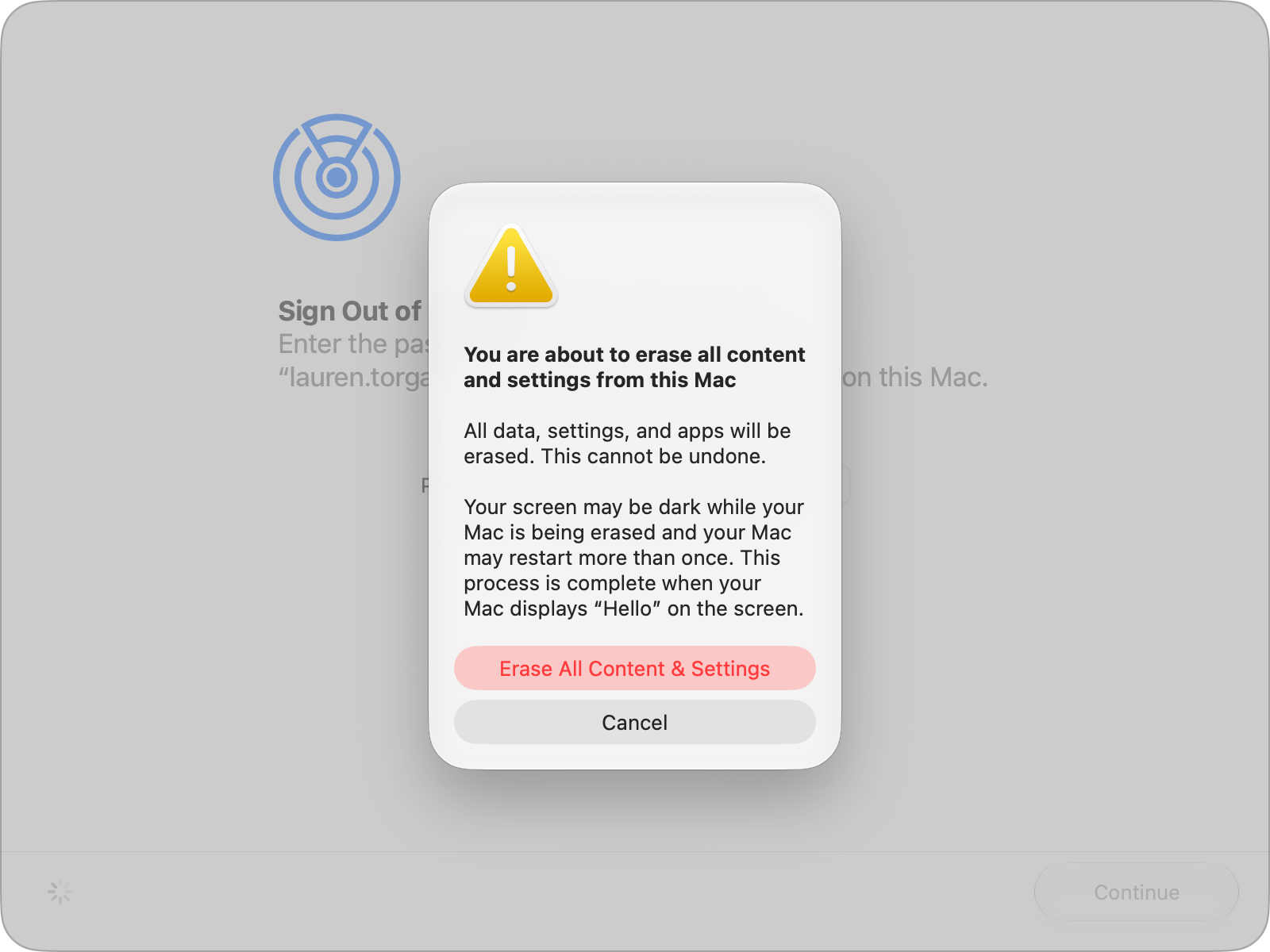
macOS 27 example of the final confirmation to recognize: Erase All Content & Settings is destructive; Cancel leaves this confirmation. The warning says the screen can go dark and the Mac may restart more than once. Complete the preparation before proceeding on your own eligible Mac.
Version notes
Apple Support supplies this asset explicitly under macos/golden-gate with the macos-27 filename, matching its current Erase Assistant procedure. Full 1600 × 1200 source screenshot preserved. Exact macOS 27 minor build undisclosed. Final warning only; no erasure, backup verification or ownership release is demonstrated.iPhone or iPad
Use Apple's handover instructions for your installed version. They cover backup, migration, unpairing an Apple Watch, signing out, erasure, and trusted-device removal. On iOS 26 or later, Settings > your name > Sign Out can offer an erase choice, so sign-out is already a consequential step. The separate erase route is Settings > General > Transfer or Reset [device] > Erase All Content and Settings.
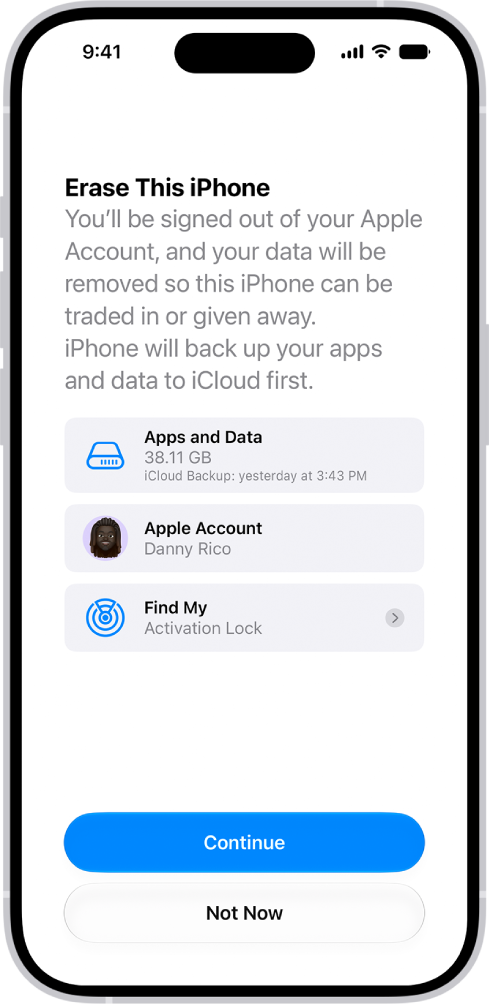
After Settings → General → Transfer or Reset iPhone → Erase All Content and Settings, review the iOS 27 Apps and Data, Apple Account and Find My entries. This is the review before continuing. Choose Not Now if preparation is incomplete; the displayed backup timestamp is Apple’s example.
Version notes
Current iOS 27 user-guide illustration, with backup-first wording. Exact minor build unknown. This review screen does not establish a completed erase or a verified independent backup.For a sale involving eSIM, Apple directs you to erase the profile when prompted; arrange service transfer first. If switching to a non-Apple phone, follow its iMessage deregistration guidance. Know your Apple Account password before the appointment: password changes at the store may encounter a security delay.
Android phone
Google's reset preparation directs readers to the manufacturer for exact device instructions. It advises waiting 24 hours after a recent Google Account password reset, charging to at least 70 percent, and allowing up to an hour for reset. Treat those as scheduling constraints.
Before transfer, address Android device protection: Google documents removing your Google Account from the device to turn that protection off. Check the manufacturer's additional account-release requirements. A button-based or remote reset can leave ownership verification to setup. A buyer should never need your old Google password to make the purchase usable.
Mac laptop
Erase All Content and Settings requires macOS Monterey 12 or later and Apple silicon or Apple's T2 Security Chip. On Ventura or later, its location is System Settings > General > Transfer or Reset. Monterey uses the System Preferences menu. The same-looking laptop body is not sufficient evidence of eligibility.
If that feature is unavailable, use Apple's separate Mac handover branch, which includes the applicable account steps, Recovery erasure, and macOS reinstallation. Read that entire route before starting; do not substitute an improvised disk operation. Apple's supported erase workflow ends at Setup Assistant, where you leave setup for the recipient.
Windows laptop
For Windows 11, locate Settings > System > Recovery > Reset PC. Microsoft's reset guide distinguishes Remove everything from Keep my files, which preserves personal files. For transfer, it recommends the Clean data option. Have the BitLocker recovery key available privately if the device is encrypted. Read the displayed scope carefully if there is additional internal storage; do not assume every disk is covered.
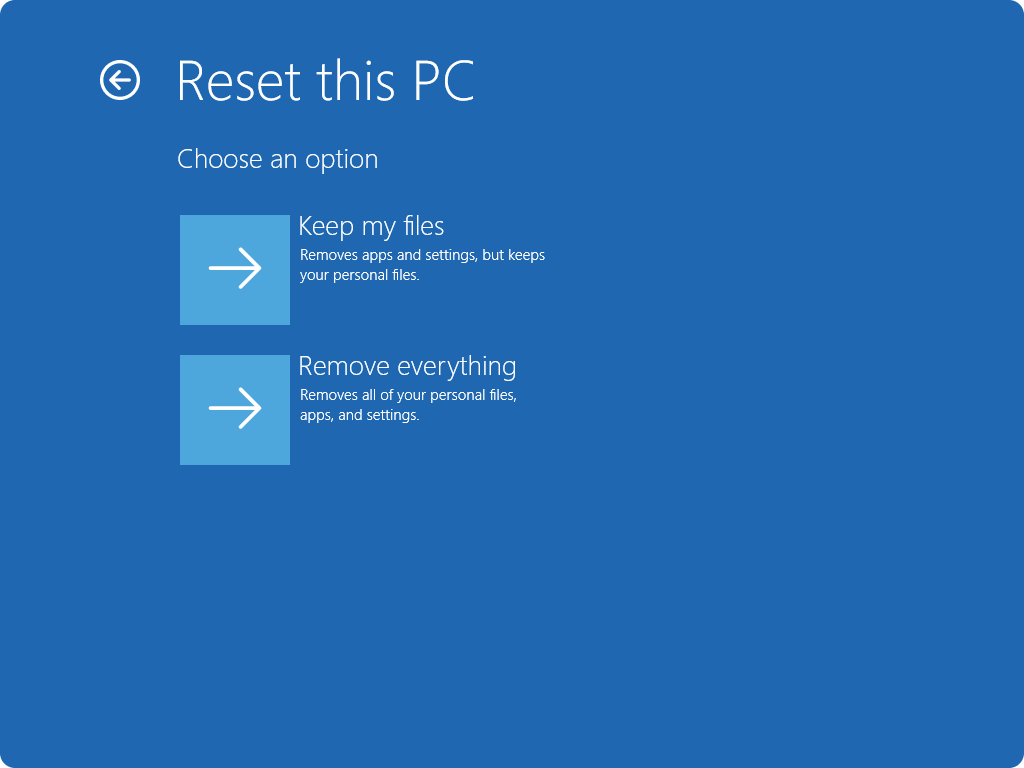
Microsoft Windows offers Keep my files and Remove everything. For a transfer, follow the Remove everything branch, then review Clean data and the displayed drive scope. Used with permission from Microsoft.
Version notes
Current Windows 11 support reference for the Windows Recovery Environment choice screen. Exact Windows/WinRE build unknown; shows the initial file-retention choices.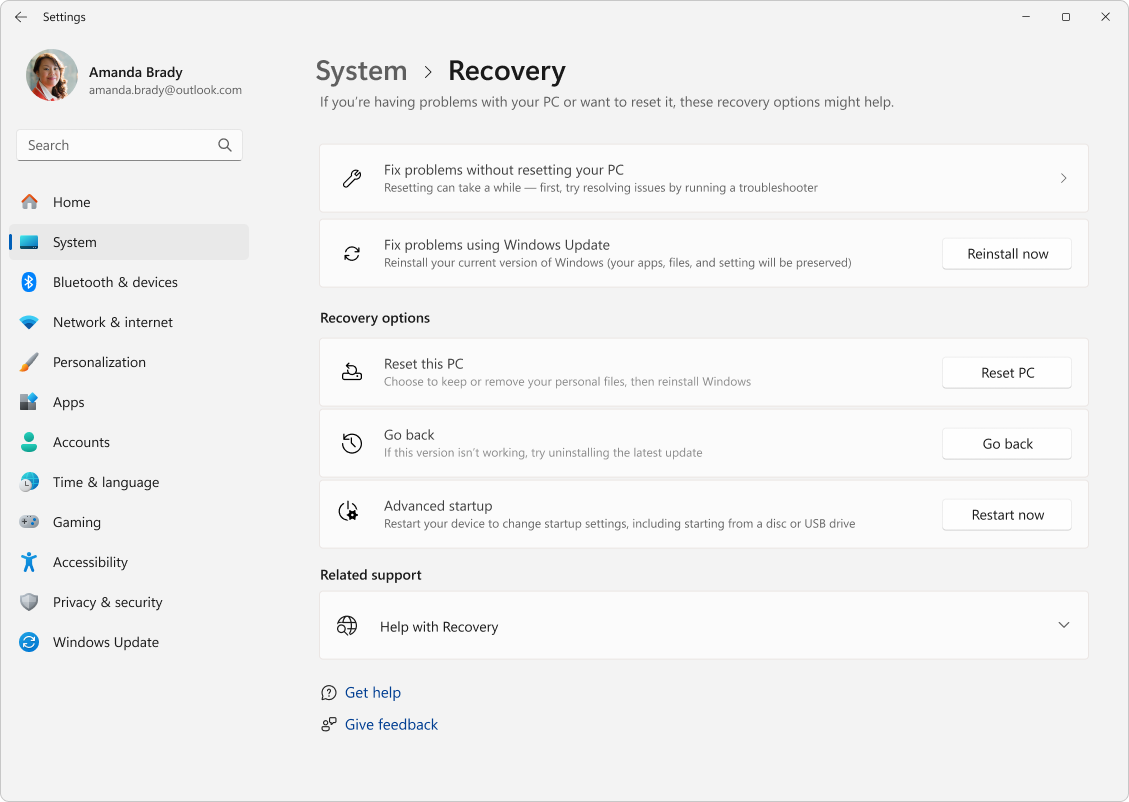
Microsoft Windows 11: locate Reset PC in System → Recovery. This is the entry screen before choosing a reset method; it does not show Clean data, additional-drive scope or a completed reset.
Version notes
Current Windows 11 System > Recovery reference from Microsoft’s reset guide. Full source screenshot retained unchanged, including its vendor demonstration profile. The layout includes Settings Home and recovery through Windows Update; no old Windows 10 or Quick Settings layout. Exact Windows build undisclosed.Microsoft says this consumer erasure does not meet government or industry erasure standards. It also warns against manually restarting during a reset even when the screen stays black for a long period. Arrange power and time accordingly.
A fast erase can have a hardware reason
Apple's deployment documentation describes erasure that destroys keys in effaceable storage, making encrypted user data cryptographically inaccessible. That explains why an appropriate supported erase need not resemble hours of writing over files. It is a hardware-and-procedure claim, not a promise about every laptop, SSD, or Android handset.
Record the device's existing encryption state and use its documented transfer procedure. Turning encryption on at the last minute is not evidence about all previously written data. This plan supplies no universal overwrite recipe. If the machine cannot complete the supported procedure, or your obligations require formal sanitization evidence, settle the disposal route with the manufacturer or a qualified provider before promising the device to a buyer.
At the appointment, separate inspection from secrets
Once your private evidence is complete, perform the selected vendor process with the device under your control. Enter credentials privately. If an unfamiliar account, unexpected storage target, or management prompt appears, stop before further destructive confirmation and resolve it through the appropriate support route.
At the final inspection, show the recipient the manufacturer-described initial setup state and confirm the agreed physical items. Where activation or ownership verification requires a network check, allow enough setup to discover an old-owner lock without entering your personal account again. A welcome screen is useful observable evidence, but it is not a forensic sanitization certificate or proof that every ownership control has been released.
If the recipient encounters your ownership lock, pause the transfer and complete the official release procedure yourself. Do not send passwords, backup keys, or recovery codes. Likewise, the recipient should enter their own credentials privately when they are ready to establish their account.
The record that remains with you
Finish the applicable account-device cleanup in the documented order. For Windows, Microsoft's transfer guidance puts device removal after backup and reset, using the device entry at account.microsoft.com/devices. Account-list removal is a separate action from erasing local storage.
Keep a private record of the transferred device, date, completed procedure, and included accessories, without recording anyone's credentials. Retain your protected backup through a transition period that covers your normal use of the replacement. If a missing project emerges next week, recover it from that copy. The former device should no longer be part of your recovery plan.
Sources, versions & scope
The steps describe the documented controls and expected checks; they are not a claim that every device or software release has been physically tested. Platform and version differences are stated with the procedure.
- Apple: Before selling, giving away, trading in, or recycling a Mac
- What to do before you sell, give away, or trade in your iPhone or iPad
- Reset your PC
- Reset your Android device to factory settings
- Erase your Mac and reset it to factory settings
- Apple: Time Machine backup settings and completed-backup status
- What to do before you sell, give away, trade in or recycle your Mac
- Help prevent others from using your device without permission
- Before you recycle, sell, or gift your Xbox or Windows PC
- Erase Apple devices — Apple Platform Deployment