An AI answer can contain a correct number, an outdated condition and a link that supports neither. Checking the answer means tracing its important claims to passages you can actually read. A bibliography alone does not finish that job.
This guide uses Gemini on the web and Chrome on a computer. You can start with an answer you already have; there is no need to generate another. Keep a separate note beside the answer so you can preserve what it originally said and record what changed.
Choose the claims that could change your decision
Copy the answer into your private working note and add the date and original question. Preserve its links. Break compound sentences into individual claims: a product supports a feature; the feature is included in a particular plan; it works in your country. Each needs its own evidence, even when the AI presents them together.
Check first the claims you would act on: a deadline, price, compatibility requirement, eligibility rule or numerical conclusion. For a long answer, mark unchecked sentences explicitly. Verifying three sentences does not certify the rest.
Give each selected claim four spaces in your note: exact wording, original source URL, supporting passage or location, and verdict. Use supported, contradicted or unresolved. “Unresolved” is useful: it stops an inaccessible source becoming an assumed fact.

Follow the link beyond its reassuring title
- In the Gemini answer, select Sources when it appears below the response or within it. Google’s computer instructions describe a panel on the right containing the available links.
- Open the relevant link in another tab. Check the destination address and page title. A recognizable institution mentioned in a link label is not proof that the destination belongs to it.
- Locate the material closest to the claim’s origin: the manufacturer’s compatibility documentation, the agency’s published rule, the research paper or the organization’s actual dataset. Follow an intermediary article’s reference onward when necessary.
A related page may explain the topic without supporting the sentence beside its citation. Likewise, several articles repeating one press release give you one underlying account. Record that shared origin rather than counting the links as independent confirmations.
If Sources is absent, search independently using the claim’s distinctive words and the responsible organization. A search restricted with site:example.org, replacing that domain with the organization’s verified domain, can narrow the results. Read the destination page; the search snippet is only a pointer. If a link is broken, search the publisher’s own site for the title. Leave the claim unresolved if you cannot recover the relevant text.
Read the passage, then the conditions around it
On the original webpage in Chrome, open More → Find and edit → Find. Enter a distinctive term or number from the claim and press Enter. Chrome highlights matches; its search instructions document this route. On Windows, Ctrl+F opens Find directly.
Read the heading and surrounding paragraphs, not just the highlighted line. Check footnotes and expand relevant questions. Words such as “may,” “selected,” “up to” and “after approval” can change what you are entitled to conclude. If Find returns no match, try a shorter term, spelling variant or unit. No match alone does not prove the claim false.
Check who and what the passage covers: personal versus business accounts, a specific model, subscription tier, country or study population. Then distinguish the page’s publication date, the period its data describes and any effective date. An updated webpage can still discuss an older study. A rule announced today may take effect later.
Copy only the short passage needed for your note, with its heading, table row or PDF page number. For a scanned PDF without searchable text, inspect the relevant pages visually; do not treat missing text-search results as missing evidence. Preserve a dated copy where permitted if the decision needs a durable record.
A small check with a clear verdict
Consider this hypothetical AI claim: “Every Gemini response includes a Sources button.” It sounds like a simple instruction, but the word “every” makes it a claim about availability.
Open Google’s View related sources from Gemini Apps page, select the Computer tab, and expand Why you might not be able to find the Sources button. Read the revealed explanation alongside the preceding instructions.
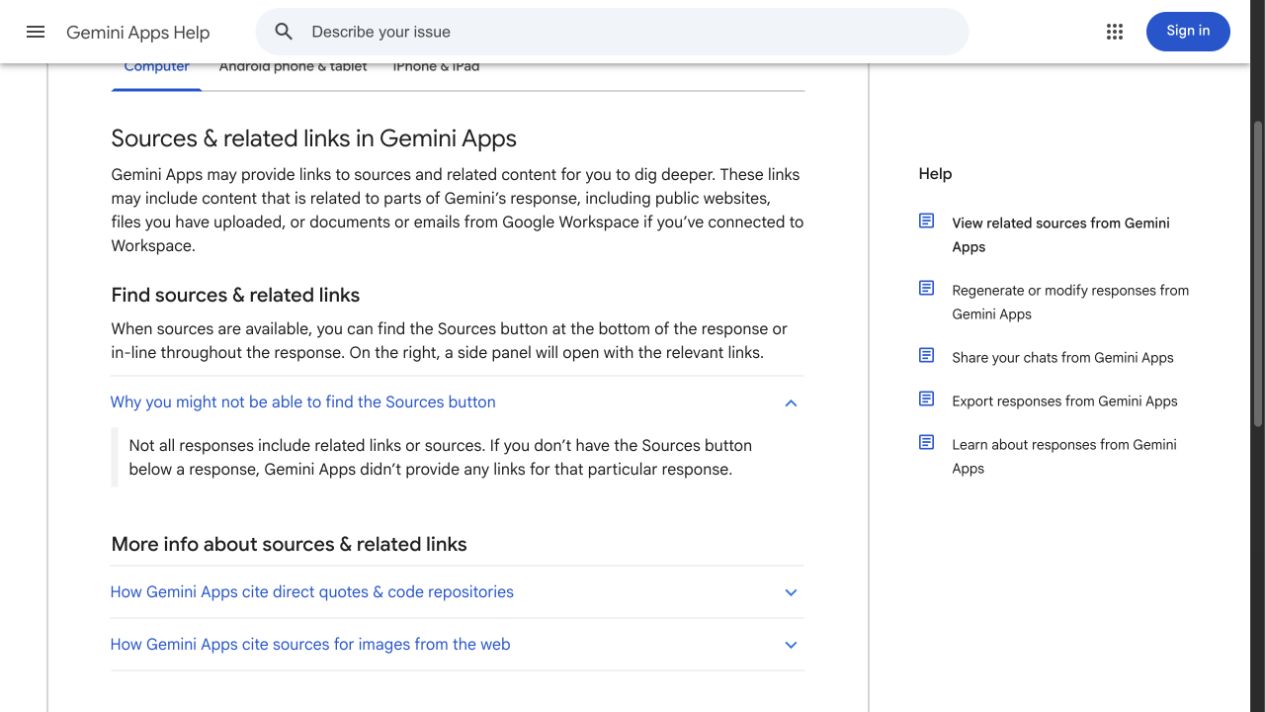
Read the exception in the original documentation: some responses have no source links. This fresh public Help-page capture checks the hypothetical claim about availability; it does not depict a Gemini answer or certify its accuracy.
Version notes
Fresh in-app browser capture of the public Google Help page on 2026-10-31. Computer tab selected; missing-Sources explanation expanded. Web service has no public release number. Full viewport preserved without edits; browser chrome is outside the captured viewport.The official explanation says links are not supplied with every response. That contradicts the hypothetical universal claim. Record the verdict as contradicted and replace it with a narrower instruction: use Sources when available; otherwise investigate the claim independently. The screenshot shows the public Help page, not a personal Gemini conversation.
This check settles button availability only. It does not establish whether any particular answer is accurate. Google’s response limitations also warn that Gemini can give misleading accounts of its own operation. Asking the same assistant whether it checked its sources cannot replace reading them.
Recalculate numbers and compare quotations
For a number, find the numerator, denominator, unit and period. Recalculate simple arithmetic yourself and check whether the AI changed the population being described.
In a hypothetical workplace survey, 40 of 200 respondents choose an option. That is 20% of respondents. If the workplace has 1,000 staff, the survey does not establish that 20% of all staff choose it: nonrespondents’ preferences remain unknown. Correct division cannot rescue an unsupported generalization.
For a quotation, locate the exact wording in the original transcript or publication. Check who said it and whether surrounding sentences qualify it. If wording cannot be located, remove quotation marks and verify any proposed paraphrase separately, or omit the passage. A plausible sentence attributed to a real person remains unverified until you find it.
Keep a corrected answer you can defend
Revise a separate copy of the answer. Attach each retained consequential claim to its evidence, restore missing conditions and remove unsupported precision. If reliable sources disagree, compare dates, definitions and populations before choosing between them. Preserve the disagreement when those checks do not resolve it.
A useful handoff contains the corrected statement, original URL, passage location, date checked and remaining uncertainty. If a source requires access you lack, request the document from its owner or mark the claim unresolved; do not substitute the AI’s description of it.
If you already circulated the answer, send a correction identifying the changed claim and supporting source. Quietly editing your own copy leaves other readers with the mistake. Keep the original and corrected versions until the correction is accepted. Finish when each decision-driving claim has an explicit verdict, rather than when the answer merely sounds more convincing.
Sources, versions & scope
The steps describe the documented controls and expected checks; they are not a claim that every device or software release has been physically tested. Platform and version differences are stated with the procedure.